How to Set Price Alerts for Any NGX Stock and Get Instant Notifications
Following the Nigerian stock market is a full time job, it should not require you to spend your entire day checking and refreshing stock prices that is why we built this tool for you.
With NextRevach, you can create a price alert for any supported stock listed on the Nigerian Exchange (NGX). When NextRevach detects that the stock has reached your selected target, you receive a notification through your chosen channels, including WhatsApp, SMS, email or push notification.
You choose the stock. You set the target. NextRevach monitors the market for you.
This allows you to focus on your work, business and daily activities without worrying about missing an important price movement.
Create Your NGX Stock Price Alert
What Is an NGX Stock Price Alert?
An NGX stock price alert is a notification that informs you when a Nigerian Exchange-listed stock reaches a price or market condition you have selected.
For example, imagine that a stock is currently trading at ₦69 per share. You may want to be notified when its price:
Rises to ₦80
Falls to ₦60
Reaches a price you are monitoring
Reaches an important 52-week price level
Records a significant percentage increase or decrease
Experiences a change in trading volume
Instead of repeatedly opening a website or app to check the stock price, you can create an alert and allow NextRevach to monitor the selected condition for you.
When the condition is detected, NextRevach sends a notification through your selected channel or channels.
Why Use NextRevach for Nigerian Stock Price Alerts?
NGX stock prices can move while you are working, attending meetings, running your business or taking care of other responsibilities.
Manually checking every stock you follow can be time-consuming. You could check too early, check too late or forget to check altogether.
NextRevach helps you:
Monitor NGX-listed stocks without watching the market continuously
Set a target price for a stock
Receive a notification when your selected condition is detected
Choose one or more notification channels
Manage your alerts from one dashboard
View active, paused and triggered alerts
Pause or reactivate alerts when necessary
NextRevach monitors the market while you get on with your day.
How to Create a Price Alert for an NGX Stock
Creating an NGX stock price alert on NextRevach takes only a few steps.
Step 1: Create or Log In to Your NextRevach Account
Visit www.nextrevach.africa and sign up to create an account.
If you already have a NextRevach account, log in using your existing details.
After signing in, you will have access to the Alert module, where you can create and manage alerts for the NGX stocks you follow.
Step 2: Open the Alert Module
Select Alert from the main navigation menu.
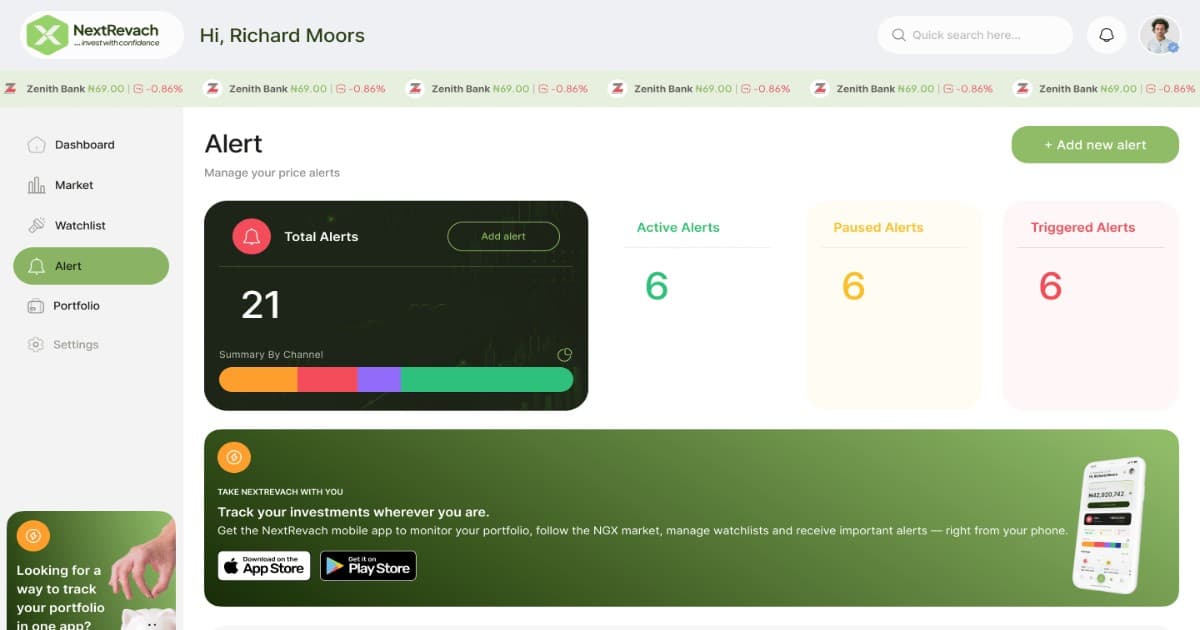
The Alert dashboard shows:
Your total number of alerts
Active alerts
Paused alerts
Triggered alerts
The stocks you are monitoring
The target price for each alert
The current status of each alert
If you have not created an alert before, the page will display an option to create your first alert.
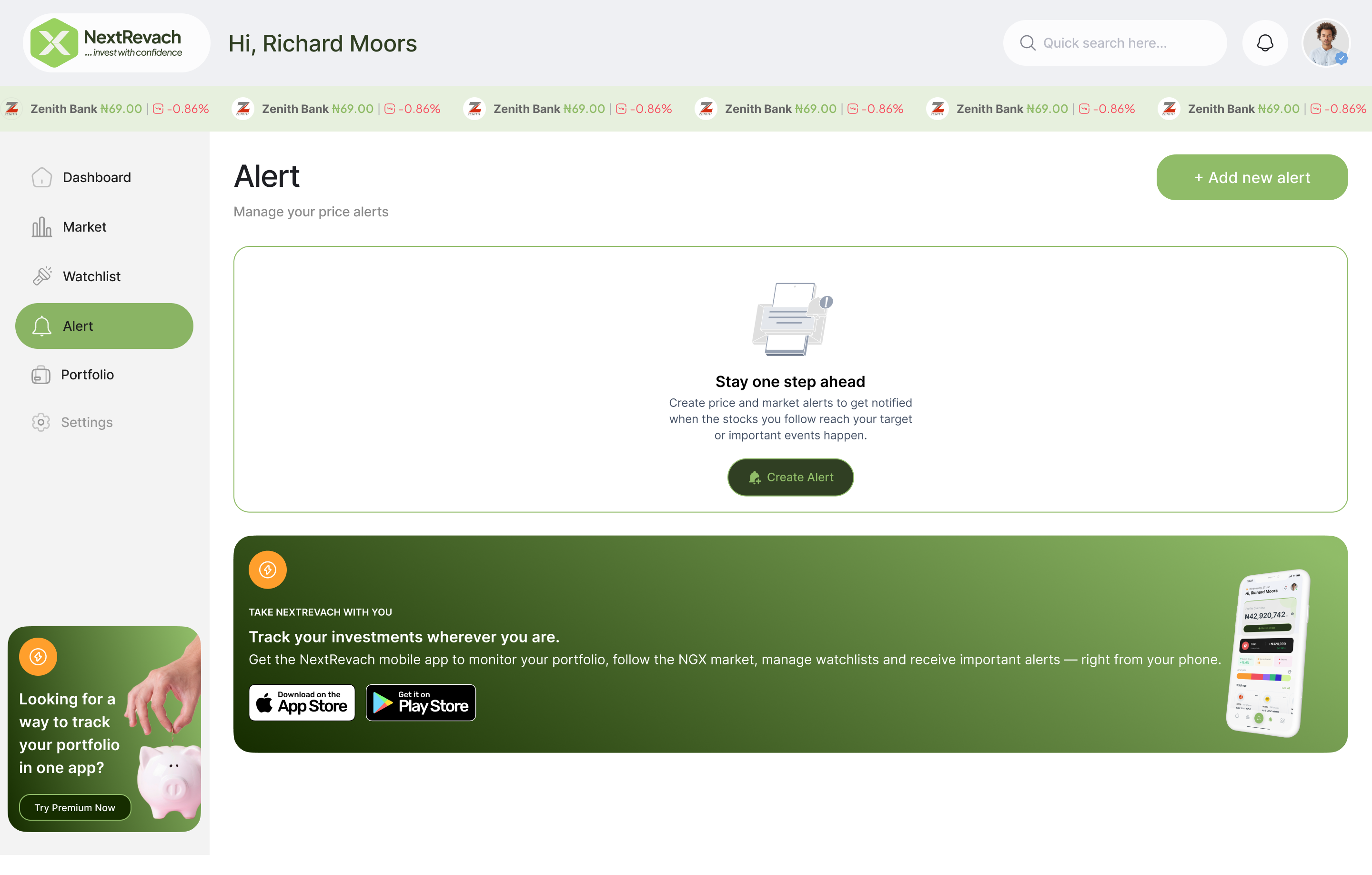
Step 3: Click “Add New Alert”
Click Add new alert at the top of the Alert page.
You can also click Create Alert if your dashboard currently has no alerts.
This will open the alert-creation process.
Step 4: Select the NGX Stock You Want to Monitor
Search for and select the NGX-listed stock for which you want to create an alert.
You can search using the company’s name or NGX ticker symbol. The selection screen displays the available companies and their current market information, helping you identify the correct stock.
You can create alerts for stocks in your portfolio, companies on your watchlist or any other supported NGX-listed equity you want to monitor.
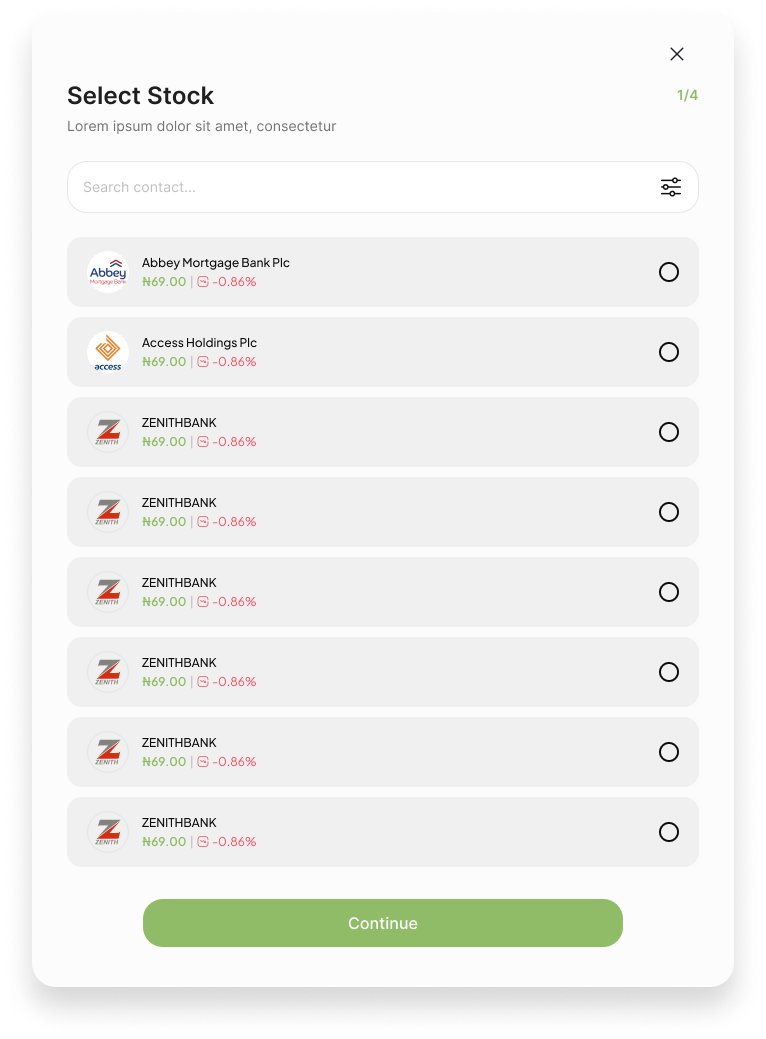
Step 5: Select Your Alert Type
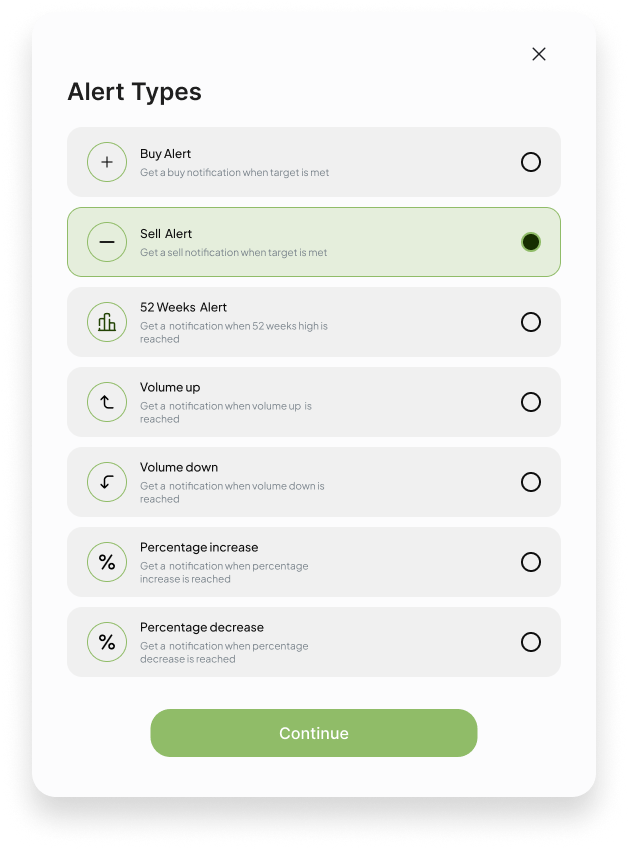
Choose the type of market event you want NextRevach to monitor.
The available alert types may include:
Buy Alert: Get notified when the stock reaches the price you are monitoring as a possible entry point.
Sell Alert: Get notified when the stock reaches the price you are monitoring as a possible exit point.
52-Week Alert: Receive a notification when the stock reaches an important 52-week price level.
Volume Up: Receive a notification when the specified increase in trading volume is detected.
Volume Down: Receive a notification when the specified decrease in trading volume is detected.
Percentage Increase: Get notified when the stock increases by your selected percentage.
Percentage Decrease: Get notified when the stock decreases by your selected percentage.
Alert types such as “Buy Alert” and “Sell Alert” are monitoring labels. NextRevach does not automatically buy or sell shares on your behalf.
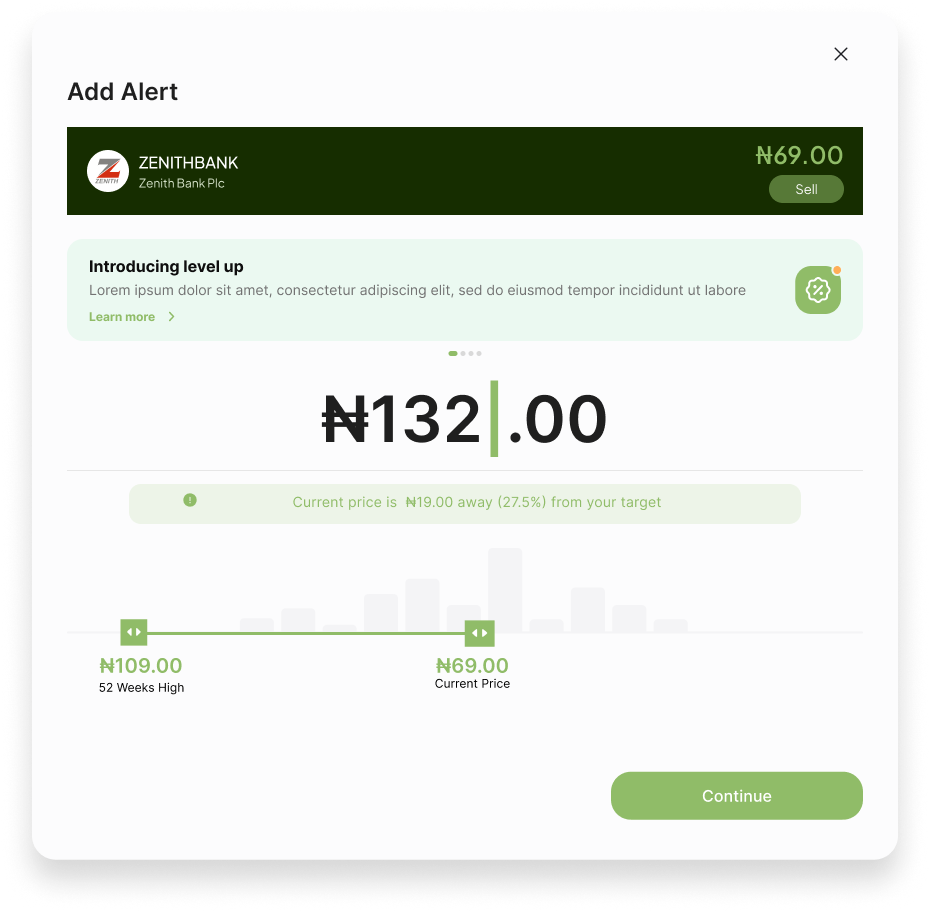
Step 6: Enter Your Target Price
Enter the price at which you want the alert to trigger.
For example, if a stock is currently trading at ₦69 and you want to be notified when it reaches ₦75, enter ₦75 as the target price.
NextRevach may also show you:
The stock’s current price
The difference between the current price and your target
The percentage distance to your target
Relevant historical price information
Review the target price carefully and click Continue.
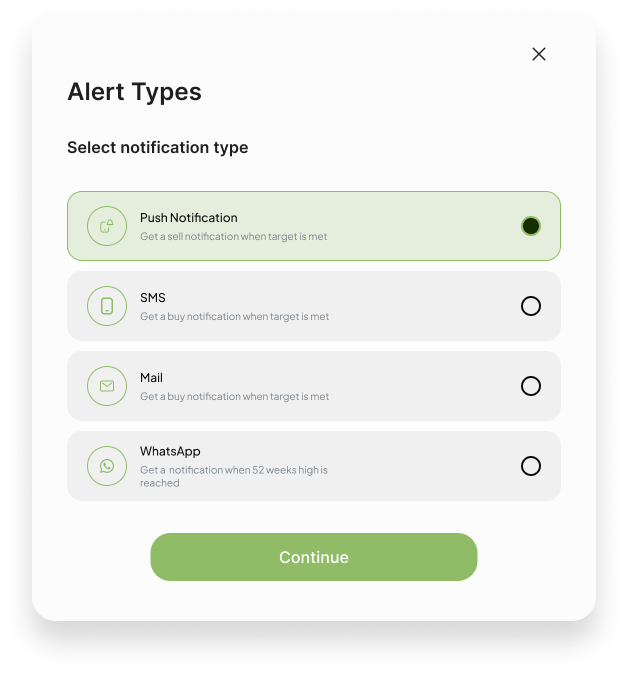
Step 7: Choose How You Want to Be Notified
Select the channel or channels through which you want to receive your alert.
Available notification channels may include:
Push notification
SMS
Email
WhatsApp
You can select more than one notification channel where supported by your account and subscription.
Provide the correct information for every channel you select:
For SMS, enter a valid Nigerian phone number.
For email, enter an active email address.
For WhatsApp, enter a valid phone number connected to WhatsApp.
For push notifications, make sure notifications are enabled for NextRevach on your device.
Using more than one channel can reduce the chance of missing an important alert.
Step 8: Review and Confirm Your Alert
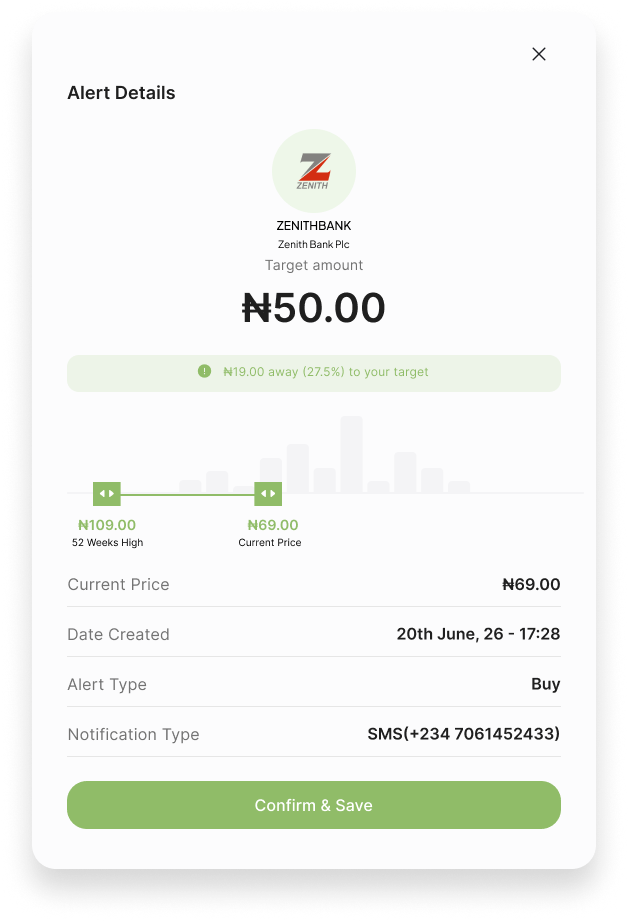
NextRevach will display a summary of your alert before it is saved.
Review the following information:
Stock name
Target price
Current stock price
Alert type
Selected notification channels
Phone number or email address
If everything is correct, click Confirm & Save.
Your new alert will be created and added to your Alerts table.
Step 9: View and Manage Your Alerts
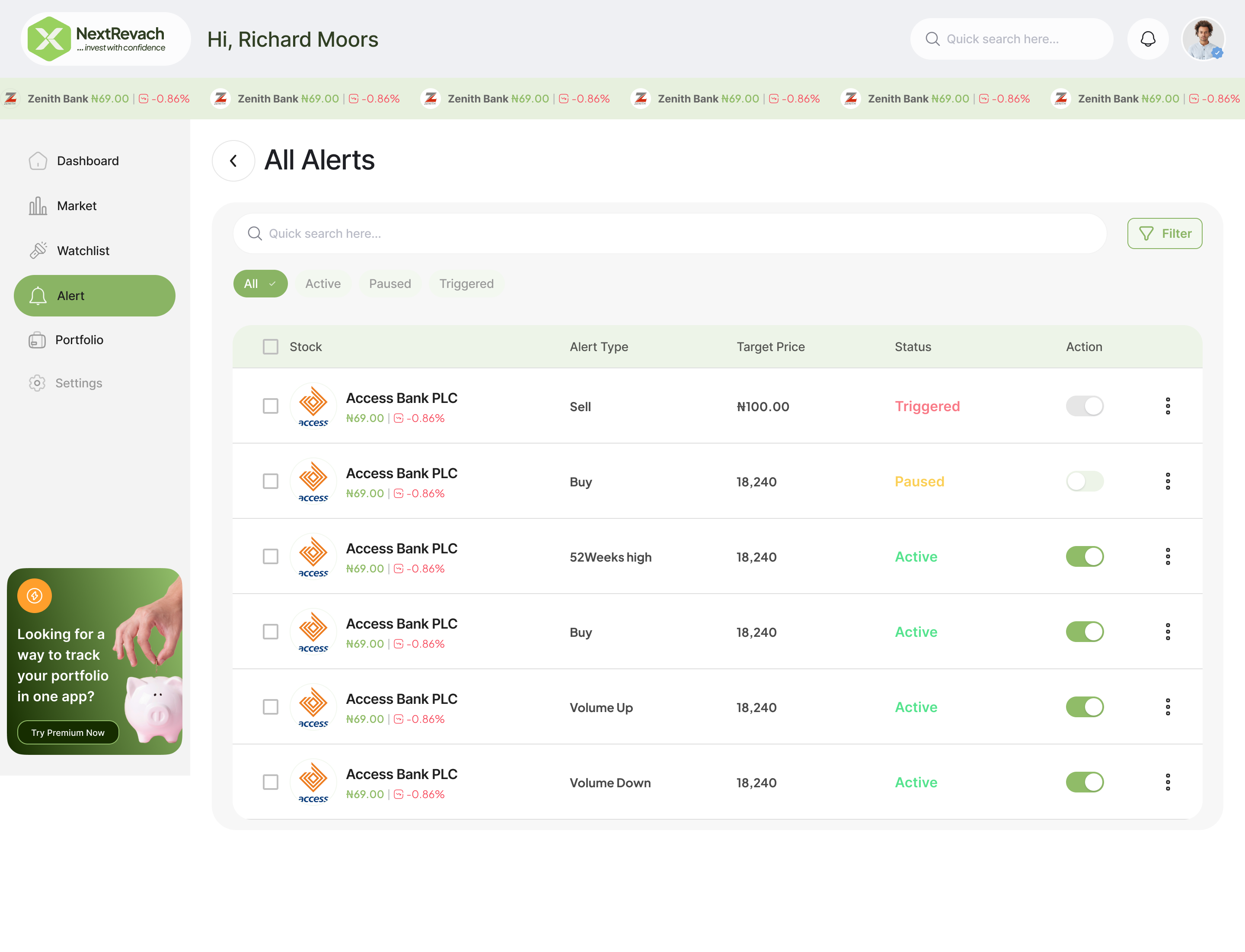
Return to the Alert dashboard or open the All Alerts table to see the alerts you have created.
For each alert, you can view:
Stock name
Alert type
Target price
Alert status
Available actions
Your alert may have one of the following statuses:
Active: NextRevach is currently monitoring the selected condition.
Paused: Monitoring has been temporarily stopped.
Triggered: The selected target or market condition has been detected.
You can pause an active alert and reactivate it later when required.
Example: Creating a Zenith Bank Price Alert
Suppose Zenith Bank is currently trading at ₦69 and you want to receive a notification when the share price reaches ₦75.
Here is what you would do:
Log in to NextRevach.
Open the Alert module.
Click Add new alert.
Search for and select ZENITHBANK.
Select your preferred alert type.
Enter ₦75 as your target price.
Select WhatsApp, SMS, email, push notification or a combination of supported channels.
Review your alert details.
Click Confirm & Save.
Once the alert is active, NextRevach monitors the selected market condition. When the target is detected, a notification is sent through your chosen channel or channels.
Receive Instant NGX Stock Alerts on WhatsApp, SMS and Email
Different people notice messages through different channels.
NextRevach therefore allows you to select the notification method that is most convenient for you.
A WhatsApp alert may be useful if WhatsApp is your primary communication app. SMS provides another direct notification option, while email gives you a message you can review later. Push notifications can deliver updates directly through your device.
Where your account supports it, you can select more than one channel for the same alert.
Stop Checking Stock Prices All Day
You should not have to spend your day repeatedly refreshing NGX stock prices.
With NextRevach, you decide which stock and price condition matter to you. NextRevach monitors the condition and notifies you when it is detected.
Whether you follow one Nigerian stock or several NGX-listed companies, you can create and manage your alerts from one dashboard.
Frequently Asked Questions
How can I set a price alert for a Nigerian stock?
Create an account or log in at NextRevach, open the Alert module and click Add new alert. Select an NGX-listed stock, choose an alert type, enter your target price, select your notification channels and confirm the alert.
Can I receive Nigerian stock price alerts on instantly on WhatsApp?
Yes. Simply select WhatsApp notifications during the alert setup and provide a valid phone number connected to WhatsApp.
Can I receive the same alert through multiple channels?
Yes, You can select multiple notification channels, including WhatsApp, SMS, email and push notification.
Which Nigerian stocks can I create alerts for?
NextRevach allows you to create alerts for all the over 140 equities listed on the Nigerian Exchange. Search for a company name or ticker symbol during the stock-selection step to confirm its availability.
Does NextRevach automatically buy or sell shares?
No. NextRevach is a stock analysis and market-monitoring platform, not a stockbroker. An alert notifies you when a condition is detected, but it does not automatically buy or sell shares.
What happens when an alert reaches its target?
When NextRevach detects that your selected target or condition has been reached, the alert is marked as triggered and a notification is sent through your selected channel or channels.
Can I pause a stock alert?
Yes. You can use the Alert dashboard to pause an active alert and reactivate it later.
Do I need to keep NextRevach open for an alert to work?
No. Once your alert has been successfully created and remains active, you do not need to keep the website open. NextRevach continues monitoring the selected condition.
Is NextRevach a Nigerian stock trading app?
No. NextRevach is a stock analysis and market-monitoring platform. It helps users follow NGX-listed equities, create alerts, maintain watchlists and monitor their portfolios. It does not execute trades on behalf of users.
Create Your First NGX Stock Price Alert
Do not wait until you have missed an important price movement.
Create your NextRevach account, select the NGX stocks that matter to you and decide exactly when you want to be notified.
You set the target. We monitor the market. You receive the alert.
Create Your NextRevach Account
NextRevach provides market information, analysis and monitoring tools for educational and informational purposes. Alert names such as “Buy Alert” and “Sell Alert” are user-defined monitoring labels and do not constitute investment advice or a recommendation to trade. Market data and notification delivery may be affected by data-provider availability, processing intervals, network conditions and third-party messaging services. Always conduct your own research and consult a qualified financial adviser where appropriate.
 0.00%
0.00%

 -0.99%